status.tw 2.0 is live
Today, we are releasing status.tw 2.0.
This is not a new coat of paint on the old website. We have rebuilt the frontend and backend, replaced outdated systems and reconsidered how status.tw presents the enormous amount of information it collects.
The result is a faster and clearer status.tw with live-updating pages, deeper statistics, better tools for server owners and a considerably more useful API.
You can try it now at status.tw.
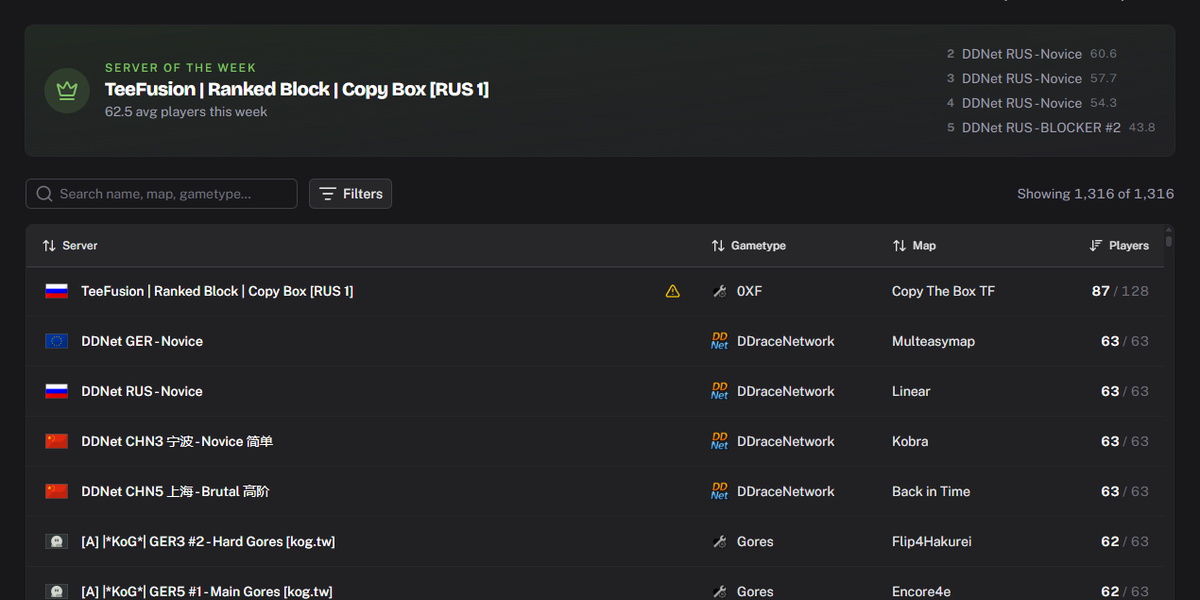
Rebuilt from the ground up
Parts of the old status.tw had been running for years. They worked, but they also made new features increasingly difficult to build and maintain.
For 2.0, we completely reworked both the backend and frontend. We cleaned up older technical decisions, modernized the underlying systems and improved our development process with better automated tests and more consistent code reviews.
Some of that work is invisible when you open the website. That is intentional. It gives us a much better foundation for maintaining status.tw and releasing future improvements without accidentally waking up bugs that have been sleeping since 2019.
The part you can see has changed quite a bit too.
Information is now presented with a clearer structure, better visual hierarchy and more useful icons. Server pages, player profiles, statistics and histories should be easier to understand without requiring previous knowledge of where every number came from.
We have kept the features available in the previous version. The goal was never to remove useful parts of status.tw simply because we were rebuilding them.
Live data without the refresh button
Server lists and detail pages now update live.
When players join or leave, a server changes its map or other information becomes available, you no longer need to reload the page to see it. This applies across the main lists and detail views.
Server and player histories have also been reworked. Instead of trying to load a large amount of data at once and making your browser regret opening the page, historical data is now loaded gradually as you browse it.
The API history endpoints use pagination for the same reason. This limits the amount of data returned by a single request and improves performance for both status.tw and applications using the API.
Sign in with Discord
The old SSO system has been removed.
You can now sign in to status.tw directly through Discord. This makes the login process considerably simpler and removes an authentication system that had long outlived its welcome.
Your account gives you access to features such as the Server Manager, API token management and your verified servers.
Unfortunately, due to technical differences between these two authentication methods, user migration was not possible. Logging in to status.tw 2.0 requires a new user account and, as a result, your servers must be verified again.
A much better Server Manager
The Server Manager has received one of the largest updates in 2.0.
Verifying a server is now easier to understand. The page explains the required steps more clearly and updates live while you complete the verification, giving you immediate feedback instead of leaving you to wonder whether anything happened.
Verified server owners can continue to add custom information to their public server pages, including a description, website and Discord invite.
The bigger change is what happens after verification.
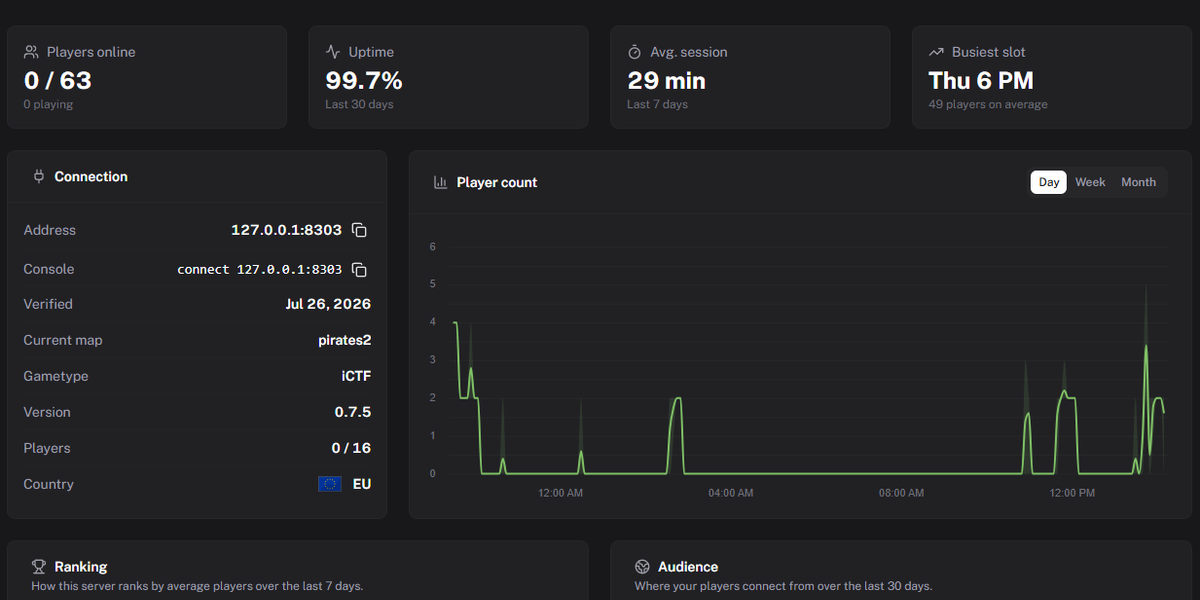
Understand how your server is performing
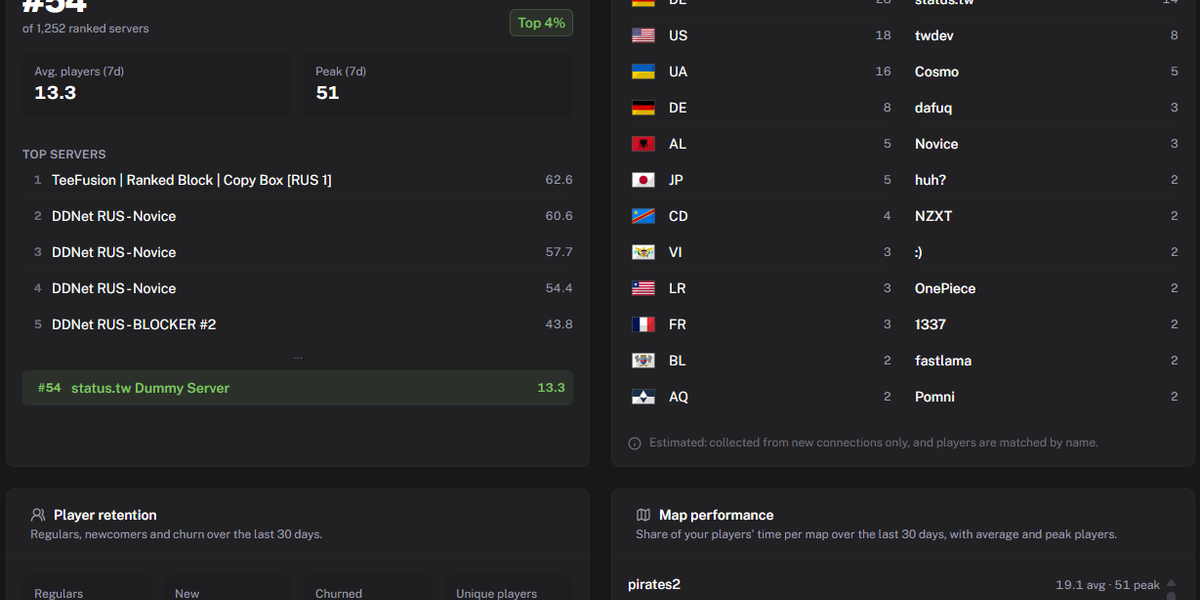
The new performance overview shows how your server compares with other Teeworlds servers and where it ranks globally.
This is not limited to a single player-count number. The Server Manager helps you understand whether people return, which parts of your server perform well and how activity develops over time.
The player insights include:
- Regular players and how frequently they return
- Players who are active every day
- New players seen during the last seven days
- Previously active players who did not return
- The countries most represented on your server
- The most active clans on your server
You can also compare the performance of your maps. This makes it easier to see which maps attract the most players and how each map performs compared with the others in your rotation.
The existing player-count chart, activity heatmap and server history remain available.
Webhooks now belong to server owners
Webhooks can now only be created for servers you own and have verified.
The old version allowed users to configure webhooks for arbitrary servers. Restricting this to verified owners makes ownership clearer and prevents unrelated users from creating integrations around servers they do not manage.
Webhooks remain available as a way to connect server events with your own tools and communities.
New player statistics
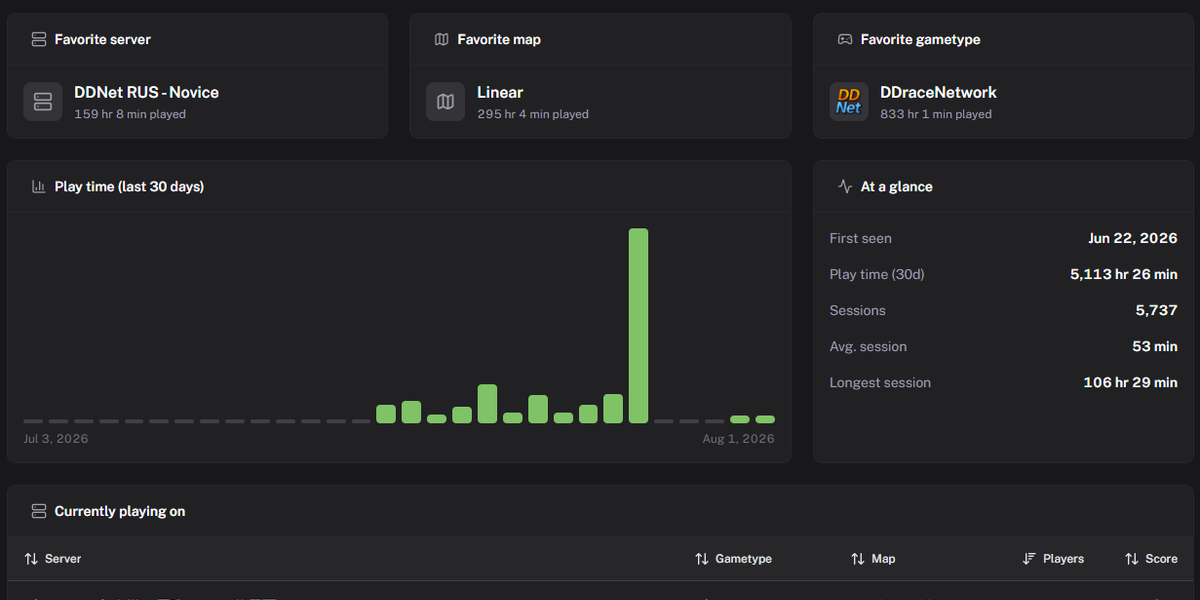
Player pages can now provide a much better picture of activity over the last 30 days.
The new statistics include:
- Total playtime
- Number of individual play sessions
- Average session duration
- Longest session
- Favorite server
- Favorite map
- Favorite game type
- Daily playtime across the complete 30-day window
Daily playtime includes an entry for every day, including days without activity. This makes the data easier to display and compare without consumers having to fill in missing dates themselves.
More community statistics
The global Statistics page now contains additional views into activity across the Teeworlds network.
A new activity heatmap shows the average global player count for every weekday and hour over the last 30 days. All slots use UTC, keeping the underlying data consistent regardless of where it is viewed.
There is also a country overview based on the countries reported by currently online players. It shows the top 20 countries ordered by player count.
Daily server statistics are now available alongside the existing weekly and monthly data.
Together with the existing statistics, these additions make it easier to see when the community is active and how that activity is distributed.
New API endpoints
status.tw 2.0 introduces several API endpoints for developers.
GET /server/top
Returns the busiest servers based on their average player count over the last seven days, together with each server's current live state.
Servers must have been online for a sufficient amount of time during the period to qualify. This prevents servers with only a tiny number of samples from appearing at the top because of one short spike.
GET /server/{ip}/{port}/heatmap
Returns the average player count for a server by weekday and hour over the last 30 days.
The slots use UTC and contain at most one entry for each weekday and hour combination. Slots without any samples are omitted instead of being returned as zero.
GET /player/name/{name}/stats
Returns the new 30-day player statistics, including total playtime, sessions, average and longest session, favorites and daily playtime.
GET /stats/servers/day
Provides daily server statistics alongside the existing weekly and monthly endpoints.
GET /stats/players/countries
Returns the countries reported by currently online players, ordered by player count and limited to the top 20 results.
GET /stats/players/heatmap
Returns the average global player count by weekday and hour over the last 30 days in UTC.
Richer server and player data
Server responses can now include a country object containing:
identifiercodeiconUrl
This object is only available when the server provides the corresponding country information.
Map data can now include the map's SHA-256 hash and file size. These fields are also optional because not every server or protocol version provides them.
Player responses now include a structured skin object containing the skin name as well as the body and feet colors.
We have also added isBot. This value is an estimate based on the available information and must not be treated as confirmation that a player is actually a bot.
API tokens and request logs
API tokens are being introduced for applications using the status.tw API.
Tokens are not mandatory at the launch of 2.0. We want to give developers enough time to create a token and add it to their software before authenticated API access becomes required.
Tokens will become mandatory by Aug 15th, 2026.
Token management will also provide usage information and a request log. This lets developers see:
- When their token was used
- Which endpoint was requested
- Whether the request was successful
- How much API usage the token has generated
Documentation that actually documents things
The API documentation has been rewritten.
Every route and field now has a description explaining what it represents, how the data is generated and which limitations or optional conditions apply.
This is particularly important for calculated data such as player sessions, averages, rankings and bot estimates. Developers should not have to reverse-engineer the meaning of a field from its name and a suspicious-looking example response.
Complete changelog
For everyone who prefers the condensed version, here is what changed in status.tw 2.0.
Platform
- Completely rebuilt frontend
- Completely reworked backend
- Modernized internal systems and dependencies
- Improved automated testing and code-review processes
- Removed the old SSO authentication system
- Added login through Discord
- Improved the visual structure of pages and data
- Added live updates to lists and detail pages
- Reworked server and player history loading
- Retained the features available in the previous version
Server Manager
- Redesigned the Server Manager
- Improved server-verification instructions
- Added live verification feedback
- Retained custom descriptions, websites and Discord links
- Added global server ranking and performance comparisons
- Added regular, returning and daily player insights
- Added new-player statistics for the last seven days
- Added information about players who did not return
- Added player country and clan insights
- Added map-performance statistics and comparisons
- Retained player-count charts
- Retained server activity heatmaps
- Retained server history
- Restricted webhooks to verified servers owned by the user
Website statistics
- Added new statistics to the global Statistics page
- Added a global player-activity heatmap
- Added a country overview for currently online players
- Added daily server statistics
- Improved the presentation of server, player and community data
API
- Added
GET /server/top - Added
GET /server/{ip}/{port}/heatmap - Added
GET /player/name/{name}/stats - Added
GET /stats/servers/day - Added
GET /stats/players/countries - Added
GET /stats/players/heatmap - Added pagination to history endpoints
- Added optional server country information
- Added optional map SHA-256 hashes and file sizes
- Added an estimated
isBotfield to players - Added structured player skin information
- Reworked the API documentation
- Prepared API-token authentication
- Added token usage information and request logging
What happens next?
Releasing 2.0 does not mean we are disappearing again until status.tw 3.0 mysteriously shows up several years from now.
We are bringing regular communication back to teeworlds.dev. Updates, fixes and upcoming changes will be shared through this blog and our Discord server. You will also be able to choose project-specific Discord roles, so you only get pinged about the projects you actually care about.
Most importantly, we want to hear how the new version works for you. If something is confusing, missing or broken, please tell us. A large part of 2.0 was shaped by feedback from people in the community, and that should continue after release.
Thank you to everyone who tested the new version, shared ideas or patiently explained which parts of the old website made absolutely no sense.
Welcome to status.tw 2.0. ❤️